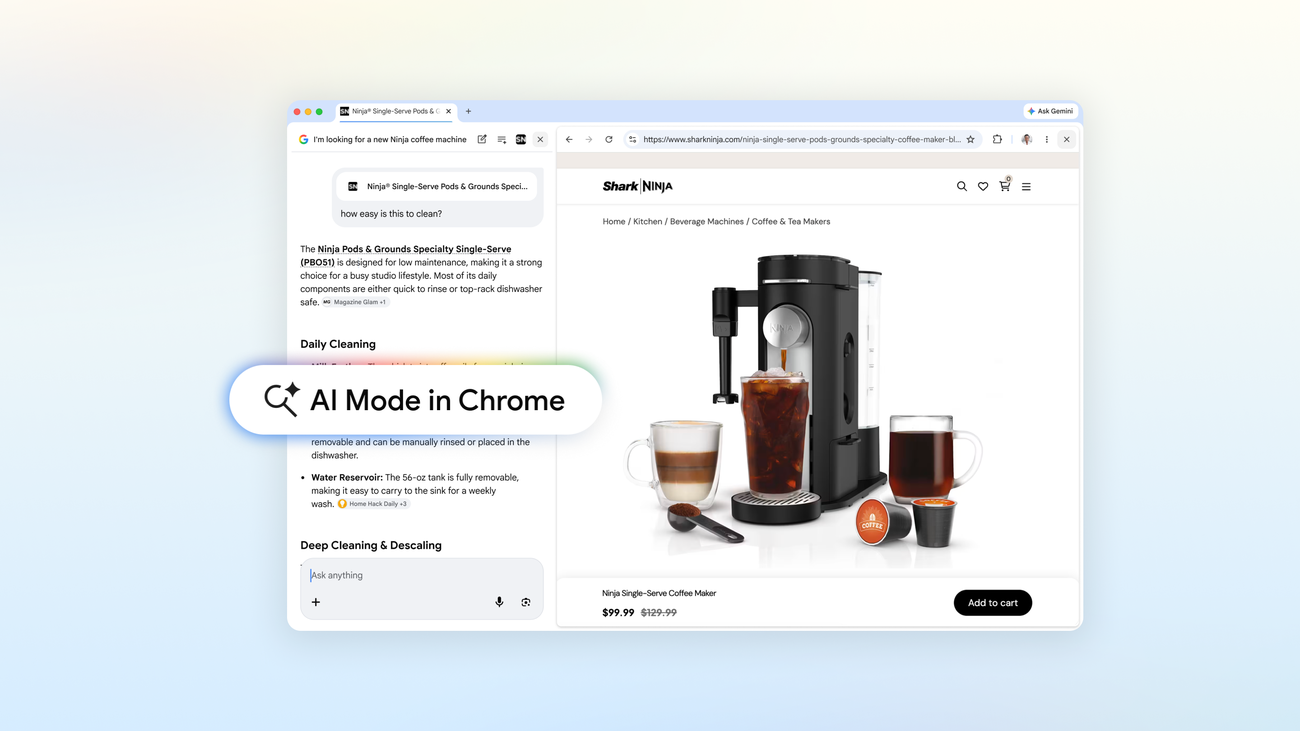
Google Introduces AI Mode in Chrome for Enhanced Web Interaction

Edited by Orin Codewell
Tools & Coding · Updated April 19, 2026
Google has launched an upgrade to Chrome's AI Mode, fundamentally changing how users interact with the web. This new feature aims to streamline web exploration by integrating AI capabilities directly into the browsing experience, enhancing user engagement and productivity.
Sources reviewed
1
Linked below for direct verification.
Official sources
1
Preferred when available.
Review status
Human reviewed
AI-assisted draft, editor-approved publish.
Confidence
High confidence
90/100 from the draft pipeline.
This AI Signal brief is meant to save busy builders time: what changed, why it matters, and where the reporting comes from.
When official material exists, we bias toward it over reactions and reposts. If you spot an issue, email [email protected] or read our editorial standards.
Share this story
Why it matters
- ✓Developers can leverage AI Mode to create more intuitive web applications that respond to user queries and actions more intelligently.
- ✓Product teams may find opportunities to integrate AI-driven features into their offerings, improving user satisfaction and engagement.
- ✓Operators can utilize the enhanced AI capabilities to optimize web performance and user experience, potentially leading to increased traffic and retention.
Google Introduces AI Mode in Chrome for Enhanced Web Interaction
Google has recently unveiled a significant upgrade to Chrome's AI Mode, transforming how users interact with the web. This enhancement integrates artificial intelligence directly into the browsing experience, aiming to streamline web exploration and improve user engagement. With these changes, Google is positioning Chrome as a more intelligent and responsive tool for navigating online content.
What happened
The upgrade to AI Mode in Chrome introduces new functionalities that allow users to interact with web content in a more dynamic way. While specific details on the features were not extensively covered in the source, the announcement indicates a shift towards a more AI-driven browsing experience. This could include smarter search capabilities, personalized content suggestions, and enhanced interaction with web applications.
Why it matters
The introduction of AI Mode in Chrome has several implications for developers, builders, operators, and product teams:
- Enhanced Development Opportunities: Developers can take advantage of AI Mode to create applications that are more responsive to user needs. This could involve building features that utilize AI to analyze user behavior and provide tailored content or suggestions.
- Integration of AI Features: Product teams may find new avenues to incorporate AI-driven functionalities into their products, potentially leading to improved user satisfaction. For instance, integrating AI chatbots or personalized recommendations could enhance user engagement.
- Optimized User Experience: Operators can benefit from the AI capabilities by optimizing their web platforms to better meet user expectations. This could lead to increased traffic and retention rates as users enjoy a more seamless and intelligent browsing experience.
Context and caveats
While the announcement from the Google AI Blog highlights the transformative potential of AI Mode in Chrome, specific details regarding the functionalities and how they will be implemented are still limited. As such, developers and product teams should remain vigilant for further updates from Google that will clarify how to best leverage these new capabilities.
What to watch next
As Google rolls out AI Mode in Chrome, it will be important to monitor how users adapt to these changes and how developers respond with new applications and features. Additionally, keeping an eye on user feedback will provide insights into the effectiveness of the AI enhancements and guide future updates. The evolution of AI in web browsing could significantly impact how users interact with online content, making it a critical area for developers and product teams to explore further.
Sources
- A new way to explore the web with AI Mode in Chrome — Google AI Blog
Newsletter
Weekly AI signal. No spam.
More in Tools

Nvidia Launches RTX Spark N1X Processor in New Laptops
Nvidia has introduced its RTX Spark N1X processor, a powerful Arm-based SoC designed for laptops…
4h ago

Granite Switch 4.1 Introduces Integrated Chat, Decision-Making, and Speech Capabilities
Hugging Face has released Granite Switch 4.1, enhancing its capabilities to integrate chat,…
16h ago
Sullivan & Cromwell Launches AI Tool for Agreement Review
Sullivan & Cromwell has partnered with OpenAI to create the Agreement Analyzer, an AI-driven tool…
16h ago

Bluesky Expands AI-Powered Attie App for Website and Game Creation
Bluesky has enhanced its Attie platform, enabling users to create interactive experiences such as…
22h ago
Comments
Sign in to join the discussion
Loading comments…